Badges, Packages & Pricing!
How do I add a badge?
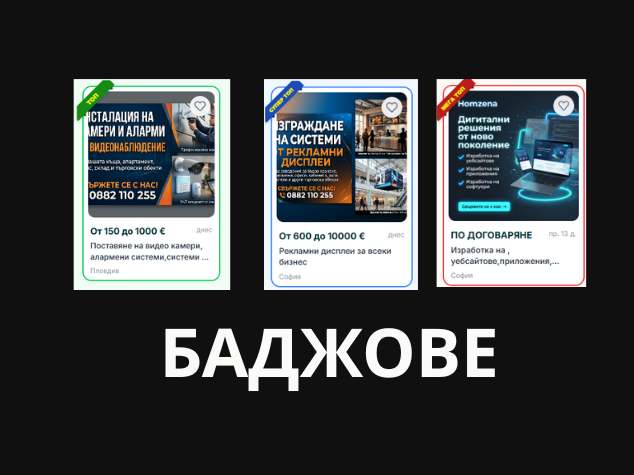
We offer three types of badges to make your ad stand out. Each badge is valid for 7 days: Mega Top (100 credits): Top position as a sponsored ad. Super Top (50 credits): Second featured section on the homepage. Top (20 credits): Third featured section for great visibility. Instructions for adding a badge: To activate a badge, you must first have published your ad. Log into your account. Open the "My Ads" section. Find the desired ad and click the "Badge" button (located next to "Extend" and "Edit"). Choose the most suitable badge for you and activate it.
Ad Activity Pricing
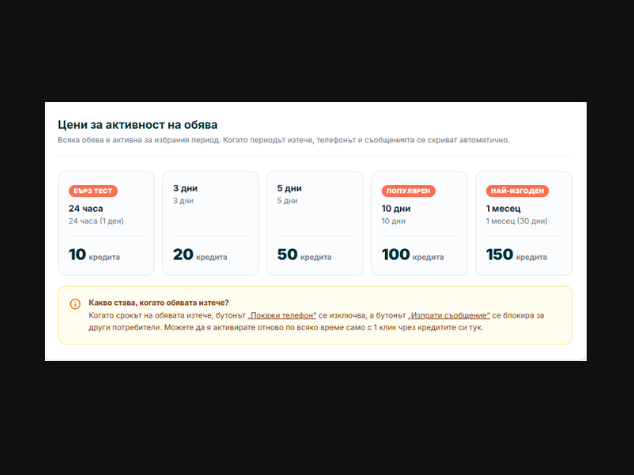
Each ad is active for a period that you choose. We offer flexible packages tailored to your needs: Quick Test (24 hours / 1 day): 10 credits 3 days: 20 credits 5 days: 50 credits Popular (10 days): 100 credits Best Value (1 month / 30 days): 150 credits What happens when the period expires? Once the selected period expires, your ad remains saved in your profile, but contact options are hidden automatically. The "Show Phone" button is deactivated and the "Send Message" option is locked for other users. Don't worry – you can extend the period and reactivate your ad at any time with just one click using your credits!
How to top up credits?
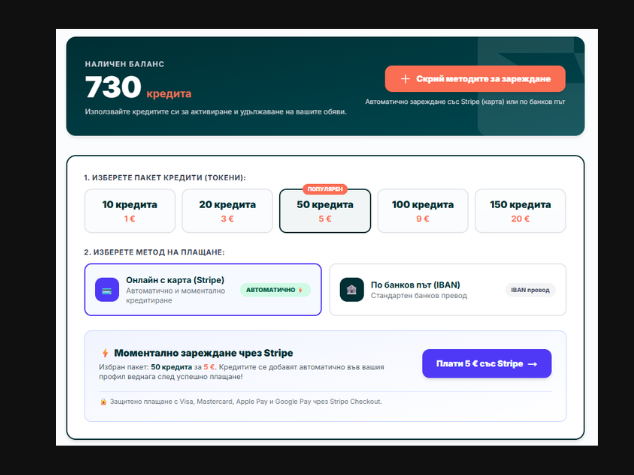
Log into your account. Go to the "Wallet" menu. Next to your available balance, click the orange "Top up credits (Card / Bank)" button. Choose one of the two payment methods: Card payment: for instant automatic top-up. Bank transfer: follow the instructions displayed on screen. If you have any questions or need assistance, feel free to contact us via the live support chat button!